- Epsilon Cluster User Guide
- Introduction
- 1. Getting Started
- 2. Overview and Dashboard Pages
- 3. Managing Users and Groups
- 4. Managing Machines
- 5. Managing Credentials
- 6. Managing Entities
- 7. Managing Properties
- 8. Workflows and Task Types
- 9. Using Macros
- 10. Storage
- 11. Setting Permissions, Restrictions, and Roles
- 12. Creating Workflow Schedules
- 13. Reports
Creating a Credential
Complete the following steps to create a credential:
Click the Credentials tab. The Credentials page opens.
Click Create New Credential. The Adding new Credential page opens.
Enter details about the credential. Ensure that:
- In the Owner dropdown, you select the group that should own the credential. If you want only yourself and not a group to own the credential, select the Personal checkbox.
- You select either a password or an SSH key for a credential, depending on what you want to use.
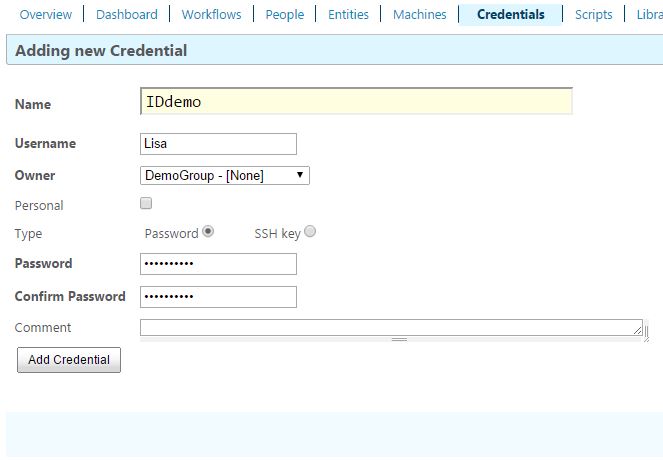
- Click Add Credential. The new credential displays on the Credentials page.